
A portion of our department consults on worksite clinics to our clients, and a question arose during a meeting whether it was possible to calculate the percentage of employees that lived within a certain radius from the proposed clinic. A representative of our team stated we could run a third-party mapping software for $250 in order to determine those statistics. Bewildered, my data analyst brain went wild. Surely, we could figure this out in Excel for the cost of $0 to our client?
In order to protect the privacy of our client, I will not disclose the mapping visualization. However, I will document the steps I took to calculate the percentages.
First, I received the most current census of the employees. The census included member name, address, city, zip code, and work facility.
Next, I created a frequency table using a pivot table that configured the distinct count of members to zip codes. I had to clean the data for duplicate and extended zip codes that needed to be combined with others. I filtered for only the relevant state and workplace location.

After that was completed, my next challenge was to determine where this zip codes were along longitude and latitude. I needed to find a .csv file with United States postal codes with longs/lats in order to match it to the zip codes I had on file. I located a free dataset here: https://www.listendata.com/2020/11/zip-code-to-latitude-and-longitude.html
Once I had all the information I needed, I was now ready to join tables. Using an INDEX, MATCH formula, I matched the zip codes to their location information and brought in the member frequencies correlated to the zip codes.
I was now ready to start the fun! Calculations. I haven’t taken a trigonometry class since high school, but I knew I needed to solve for a radius problem and googled for some equations that could calculate the distance between two points on planet earth. I tested a few until I found one that worked with accuracy closely aligned to Google Maps:

Using the proposed location of the worksite clinic, I was then able to calculate the difference in miles from Point A (clinic) to Point B (employee zip code). After the miles had been established, I used an IF statement to determine if the employee was 10 or 20 miles away from the clinic, and what the total percentage would be.
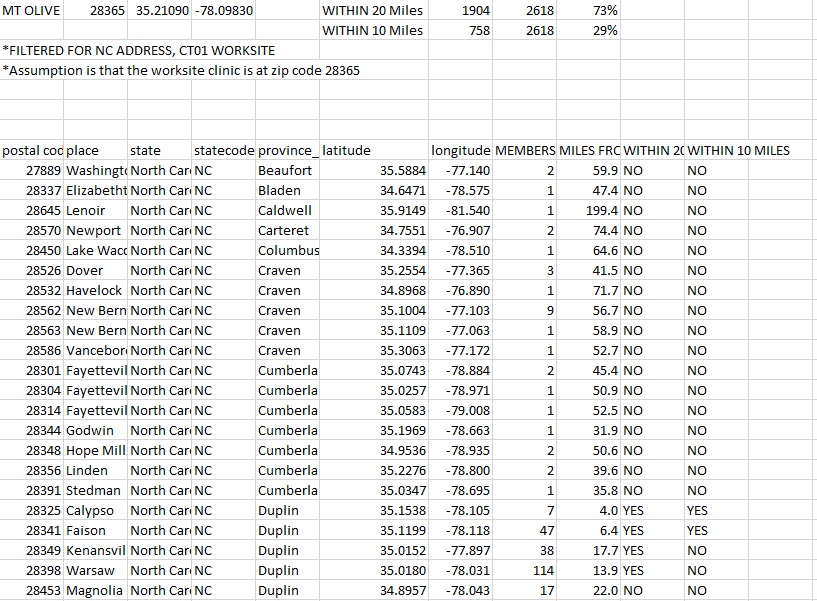
After my analysis was complete, I was able to determine that 73% of employees lived within 20 miles of the proposed clinic, and 29% lived within 10 miles. Combined with the employees being at work, this allows much greater access to healthcare for employees that live in a rural population.

Not only did I save our account team and client money, I had fun coming up the calculations to have solve the issue!
 Handled with Data
Leave a comment